[oik] plugins.com

WordPress plugins and themes

  • Home
  • About
    • lazy shortcodes
    • smart shortcodes
    • oik base plugin
      • oik – donate
      • oik PayPal buttons
      • oik installation
      • oik Button Shortcode button
      • oik changelog
      • oik FAQ
      • oik plugins on SVN
      • oik plugins on GitHub
  • Plugins
    • oik base plugin
    • FREE oik plugins
    • WordPress plugins
    • Premium oik plugins
    • Bespoke oik plugins
  • Shortcodes
    • Shortcode examples
  • Blocks
    • Block examples
  • APIs
    • ALL action and filter hooks
  • Blog
You are here: Home / WordPress plugins from oik-plugins / FREE oik plugins / oik-bwtrace – debug trace for WordPress / Getting started with oik-bwtrace v3.0.0

Getting started with oik-bwtrace v3.0.0

oik-bwtrace v3.0.0 writes trace files to a directory you specify. Follow these steps to enable tracing. Note: Until you’ve specified a valid directory name it won’t produce any trace output.

Steps to enable tracing

  1. Install and activate oik-bwtrace

    Install and activate oik-bwtrace using standard methods

  2. View Settings > oik trace options

    Choose the Settings > oik trace options menu item to display the trace options page. The first section to complete is Trace files.
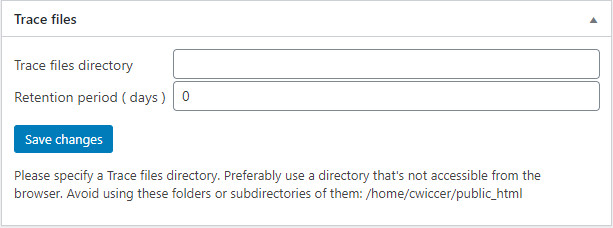
  3. Enter the directory where trace files should be written

    e.g. /home/cwiccer/bwtrace or C:/apache/htdocs/wordpress/bwtrace

  4. Set the Retention period in days

    This value is used in subsequent steps. Note: Purging of trace files is not performed automatically.

  5. Save changes

    Click on the Save changes button.
    This action may create the Trace files directory.

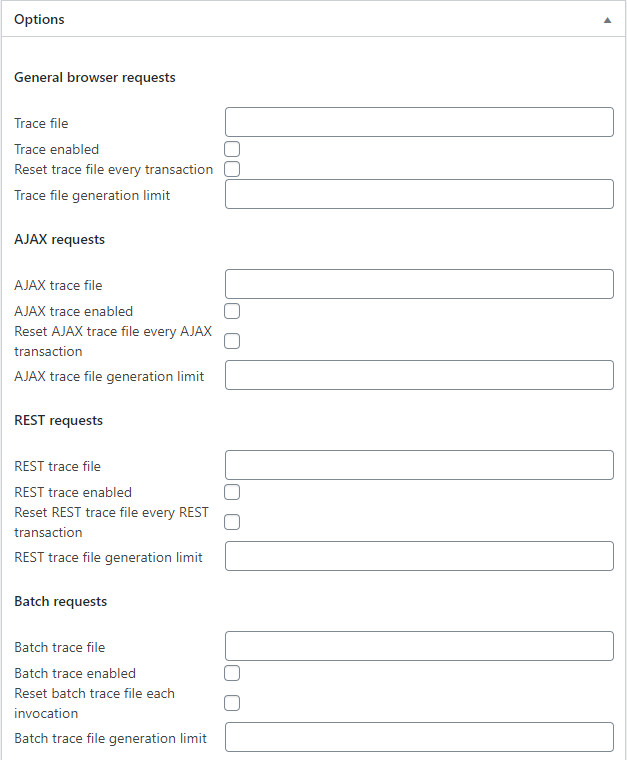
  6. Complete the Options box – requests sections

    Complete the sections for the transaction types you want to trace.
  7. Complete the Options box – Trace records

    Select the Trace level from the dropdown. Select the information you want logged to each trace record. Optionally select a specific IP address whose requests you want to trace.
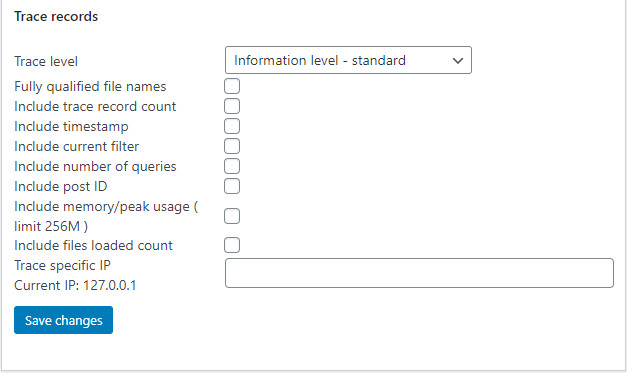
  8. Save changes

    Click on the Save changes button in this box to save your changes.

  9. Daily Trace Summary

    Select the Log transactions to daily trace summary file checkbox to instruct oik-bwtrace to log all of the transactions handled by WordPress in a summary file.
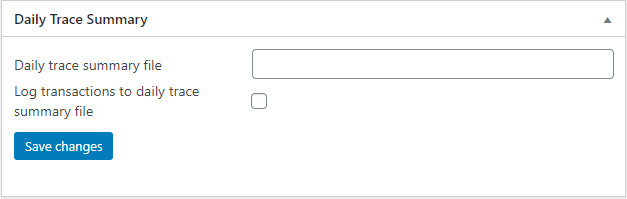
  10. Save changes

    Click on the Save changes button in this box to save your changes.

  11. Check it’s working

    If you’ve selected tracing of General browser requests the Trace files section should now show a summary of the trace files generated.
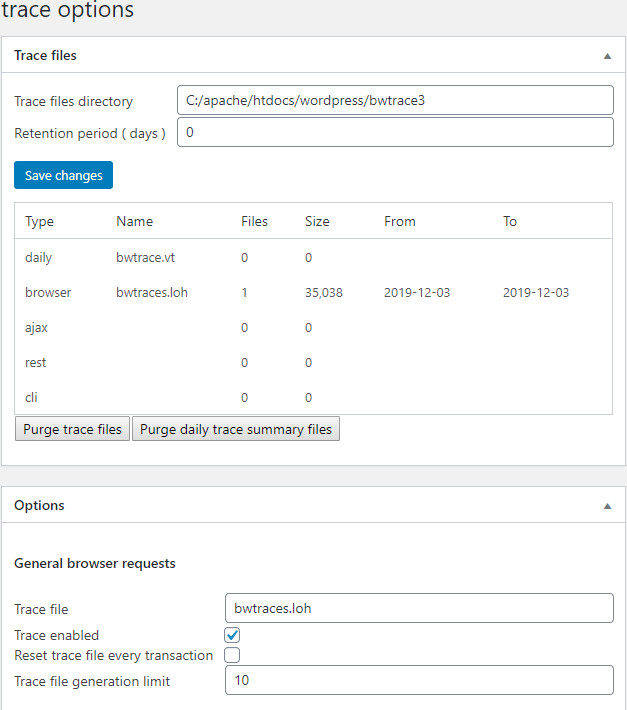
  12. Now view the generated trace file(s)

    See Viewing trace files.

Further reading

  • Trace files
  • Trace options – requests sections
  • Trace options – Trace records
  • Daily Trace Summary
  • Viewing trace files

Published: December 3, 2019 | Last updated: December 1, 2020

Information

Component:
  • oik-bwtrace – debug trace for WordPress
Letters: G

Recent plugin updates

oik-weight-zone-shipping v0.2.13 oik-weight-zone-shipping v0.2.13 has been tested with WooCommerce 10.1.2 and WordPress 6.8.2 ...
SB Children Block v1.3.0 Upgrade to SB Children Block v1.3.0 for support for PHP 8.3 and PHP 8.4  ...
oik v4.15.3 Update to oik v4.15.3 for a couple of security fixes. Tested with WordPress 6.8.2 ...
oik-privacy-policy v1.4.9 Update to oik-privacy-policy v1.4.9 for a security fix. Tested with WordPress 6.8.2 and PHP 8.3 and PHP 8.4 ...
oik-nivo-slider v1.17.0 oik-nivo-slider v1.17.0 introduces the Nivo slider block - oik-nivo-slider/nivo. ...

Plugins

  • All Plugins
  • oik base plugin
  • FREE oik plugins
  • WordPress plugins
  • Premium oik plugins

Themes

  • FREE themes
  • Bespoke themes
  • Premium themes

Blocks

  • All Blocks
  • Block examples
  • About Blocks

Shortcodes

  • All Shortcodes
  • Shortcode examples
  • About Shortcodes

Reference

  • About APIs
  • All APIs
  • All Classes
  • All Files
  • All Hooks

Support

  • Contact
  • Cookies policy
  • Get API key
  • Privacy
  • Request support
  • Sitemap
  • Stay informed
  • Terms and Conditions
oik-plugins
Email: oikplug@oik-plugins.com

Weight shipping plugins

Find out which cart weight shipping plugin you need for your WooCommerce site.
Which cart weight based plugin do I need?

Site:  www.oik-plugins.com
© Copyright oik-plugins 2011-2025. All rights reserved.


Website designed and developed by Herb Miller of Bobbing Wide
Proudly powered by WordPress and oik-plugins

WordPress version: 6.8.3

Gutenberg version: 21.7.0

PHP version: 8.2.29